Showing posts with label Window Azure. Show all posts
Showing posts with label Window Azure. Show all posts
Sunday, July 17, 2016
send push notification
https://azure.microsoft.com/en-us/documentation/articles/notification-hubs-android-push-notification-google-gcm-get-started/

Saturday, April 9, 2016
Node js on Azure
https://azure.microsoft.com/en-us/develop/nodejs/
https://azure.microsoft.com/en-us/documentation/articles/web-sites-nodejs-develop-deploy-mac/
Saturday, December 20, 2014
network access list VM
http://michaelwasham.com/windows-azure-powershell-reference-guide/network-access-control-list-capability-in-windows-azure-powershell/
Friday, December 19, 2014
Azure website brought up login.microsoftonline.com (Sign in with your work or school account)
http://stackoverflow.com/questions/27558332/azure-website-brought-up-login-microsoftonline-com-sign-in-with-your-work-or-sc/27558834#27558834
You are seeing the Azure AD login page because the website has been setup with Authentication / Authorisation to use Azure AD.
Log into the Azure Portal and find your Website instance > Click 'Configure' tab. Scroll down until you find the 'authentication / authorization' section and click on the 'Remove' button to disassociate your website with Azure AD.
Thursday, December 18, 2014
Azure web farm
http://michaelwasham.com/2012/08/13/publishing-and-synchronizing-web-farms-using-windows-azure-virtual-machines/
http://www.wadewegner.com/2013/03/using-windows-azure-virtual-machines-to-publish-and-synchronize-a-web-farm/
http://www.wadewegner.com/2013/03/using-windows-azure-virtual-machines-to-publish-and-synchronize-a-web-farm/
i, I have a website done in ASP.Net MVC which hosted in Azure and it will try to connect to a VM machine hosted on Azure which has MongodDB installed and running. tt will need to connect to port 27017.
When I tested on my local machine, I can connect to the VM MondgoDB no issues, then I published to Azure web site and it brought up www.microsoftonline.com login, saying sign in the Azure Active directory on the title bar and prompted login for "sign in with your work or school account.
It seems to me Azure has certain fire wall or ??? to prevent port 27017 from the web server (xxxxx.azurewebsites.net). Any ideas?
Thanks
Greg
Thursday, December 11, 2014
How do I delete an Azure storage account containing a leased blob?
Failed to delete Storage account 'portalvhdscwtwycpsxxxxx'

Details:

Storage account portalvhdscwtwycpsxxxxx has 1 container(s) which have an active image and/or disk artifacts. Ensure those artifacts are removed from the image repository before deleting this storage account
The key to the solution is the message that the container has an active disk artifact and the advice to remove it from the repository.
The procedure to remove the disk image from the blob repository is:
- Go to the Windows Azure Management Portal.
- Click on Virtual Machines.
- Click on Disks.
- Click on the disk.
- Click on Delete Disk.
After that, the storage account can be deleted.
Notes:
- This applies even if you've already deleted all of your Virtual Machines and it shows 0; there still will be artifacts under the disks tab.
- Disks are detached from a deleted VM asynchronously, it may take a few minutes after the VM is deleted for this field to clear up.
http://stackoverflow.com/questions/10969012/how-do-i-delete-an-azure-storage-account-containing-a-leased-blobAzure storage
http://blogs.msdn.com/b/windowsazurestorage/archive/2014/03/11/windows-azure-storage-explorers-2014.aspx
Tuesday, December 9, 2014
Saturday, November 15, 2014
Publish website to Azure from VS2013
When doing publish need to check setting to make sure SQL db ID and password is correct.
If error displaying data, go to VS2013 "SQL Server Object Explorer" check Configuration, especially the Connection String and you can change that if not correct.

If error displaying data, go to VS2013 "SQL Server Object Explorer" check Configuration, especially the Connection String and you can change that if not correct.
Friday, October 24, 2014
Azure sever password reset
http://stackoverflow.com/questions/13790752/password-reset-for-azure-database
If you're referring to the administrative password for a specific Windows Azure SQLDatabase server, you can do this from the new portal. Select the Database choice on the left, then select Servers:
Then, after selecting the server of choice, you'll see the option on the right forresetting admin password:
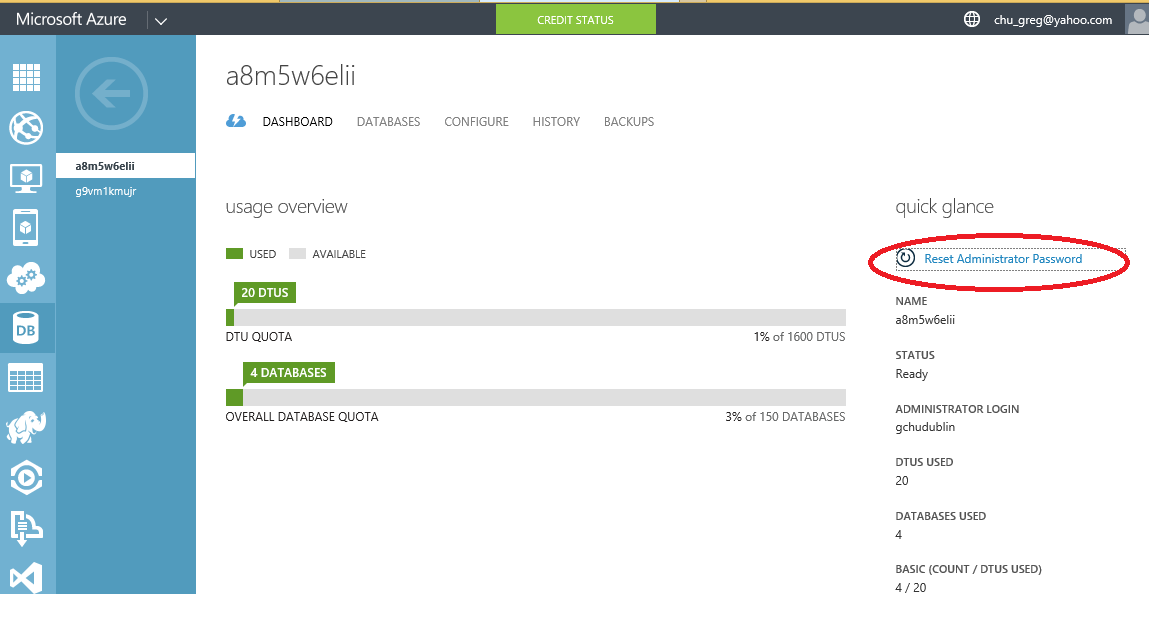
If you're referring to the administrative password for a specific Windows Azure SQL
Then, after selecting the server of choice, you'll see the option on the right for
Wednesday, October 15, 2014
Microsoft Azure domain email
http://azure.microsoft.com/en-us/gallery/store/sendgrid/sendgrid-azure/
Saturday, October 11, 2014
The "CheckRemoteFx45" task could not be loaded from the assembly C:\Program Files (x86)\MSBuild\Microsoft\VisualStudio\v12.0\Web\Microsoft.Web.Publishing.Tasks.dll. Confirm that the declaration is correct, that the assembly and all its dependencies are available, and that the task contains a public class that implements Microsoft.Build.Framework.ITask.
The "CheckRemoteFx45" task could not be loaded from the assembly C:\Program Files (x86)\MSBuild\Microsoft\VisualStudio\v12.0\Web\Microsoft.Web.Publishing.Tasks.dll. Confirm that the <UsingTask> declaration is correct, that the assembly and all its dependencies are available, and that the task contains a public class that implements Microsoft.Build.Framework.ITask.
If you see the above when publishing website, you can just download the website profile from Asure portal and import into the web publish (on the Publish Web Profile section) and it worked fine.
But not quite. I had to clean up Visual studio installs by removing all versions not needed and it worked fine again. You need lots of programming experience to know what I did. Lots of times it is by intuition based on all past experiences.
If you see the above when publishing website, you can just download the website profile from Asure portal and import into the web publish (on the Publish Web Profile section) and it worked fine.
But not quite. I had to clean up Visual studio installs by removing all versions not needed and it worked fine again. You need lots of programming experience to know what I did. Lots of times it is by intuition based on all past experiences.
Tuesday, September 9, 2014
Subscribe to:
Posts (Atom)