http://www.c-sharpcorner.com/UploadFile/718fc8/consuming-web-service-in-console-application/
IntroductionHere I am creating a simple web service and using it in a console application. Using a web service in a console application is similar to using a web service in window application. At first, we create a web service. Follow the given steps.
- Create new project
- Select ASP.NET Empty Web Application
- Give name to your project and click ok button
- Go to Solution Explorer and right click at your project
- Select Add New Item and select Web Service application
- Give it name and click ok button
using System;
using System.Collections.Generic;
using System.Linq;
using System.Web;
using System.Web.Services;
namespace myproject
{
/// <summary> /// Summary description for MyService /// </summary> [WebService(Namespace = "example.abc/")]
[WebServiceBinding(ConformsTo = WsiProfiles.BasicProfile1_1)]
[System.ComponentModel.ToolboxItem(false)]
// To allow this Web Service to be called from script, using ASP.NET AJAX, uncomment the following line. // [System.Web.Script.Services.ScriptService] public class MyService : System.Web.Services.WebService {
[WebMethod(Description="show simple message")]
public string show()
{
return "My Web Service Application";
}
[WebMethod(Description = "show datetime")]
public string showdate()
{
return DateTime.Now.ToLongDateString();
}
[WebMethod(Description = "addition of two int")]
public int add(int a,int b)
{
return a + b;
}
}
}
Run the application
Output window:

using System.Collections.Generic;
using System.Linq;
using System.Web;
using System.Web.Services;
namespace myproject
{
/// <summary> /// Summary description for MyService /// </summary> [WebService(Namespace = "example.abc/")]
[WebServiceBinding(ConformsTo = WsiProfiles.BasicProfile1_1)]
[System.ComponentModel.ToolboxItem(false)]
// To allow this Web Service to be called from script, using ASP.NET AJAX, uncomment the following line. // [System.Web.Script.Services.ScriptService] public class MyService : System.Web.Services.WebService {
[WebMethod(Description="show simple message")]
public string show()
{
return "My Web Service Application";
}
[WebMethod(Description = "show datetime")]
public string showdate()
{
return DateTime.Now.ToLongDateString();
}
[WebMethod(Description = "addition of two int")]
public int add(int a,int b)
{
return a + b;
}
}
}
Run the application
Output window:
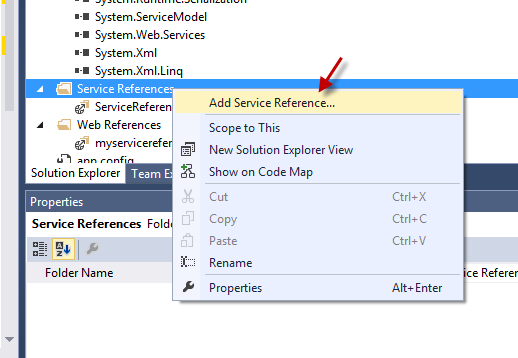
Now, create a new project and take Console Application. Add the service reference. For doing this, follow the given steps.
- Go to Solution Explorer and right click at your application.

- Click Add Service Reference. A new window will be open.

- Click the "Advanced" button. A new window will be open.

- Again click the "Add Web Reference" button. Again a new window will be open.

- Copy the URL of your running service application and paste to it at URL( As given in above figure) and click the "Go" button.

- Set the service reference name. The default name is "localhost". Now click the "Add Reference" button.

using System;
using System.Collections.Generic;
using System.Linq;
using System.Text;
namespace MyApplication
{
class Program
{
static void Main(string[] args)
{
myservicereference.MyService obj = new myservicereference.MyService();
Console.WriteLine(" Calling Web Methods");
Console.WriteLine("---------------------");
Console.WriteLine("\n Calling show Method");
Console.WriteLine(" "+obj.show());
Console.WriteLine("\n\n"+" Calling showdate Method ");
Console.WriteLine(" "+obj.showdate());
Console.WriteLine("\n Calling add Method ");
Console.Write(" Enter First Number:");
int a = Convert.ToInt32(Console.ReadLine());
Console.Write(" Enter Second Number:");
int b = Convert.ToInt32(Console.ReadLine());
Console.WriteLine("\n Addition is:" + obj.add(a, b).ToString());
Console.ReadLine();
}
}
}
Press Ctrl+f5 to run the code.
Output:

{
class Program
{
static void Main(string[] args)
{
myservicereference.MyService obj = new myservicereference.MyService();
Console.WriteLine(" Calling Web Methods");
Console.WriteLine("---------------------");
Console.WriteLine("\n Calling show Method");
Console.WriteLine(" "+obj.show());
Console.WriteLine("\n\n"+" Calling showdate Method ");
Console.WriteLine(" "+obj.showdate());
Console.WriteLine("\n Calling add Method ");
Console.Write(" Enter First Number:");
int a = Convert.ToInt32(Console.ReadLine());
Console.Write(" Enter Second Number:");
int b = Convert.ToInt32(Console.ReadLine());
Console.WriteLine("\n Addition is:" + obj.add(a, b).ToString());
Console.ReadLine();
}
}
}
Press Ctrl+f5 to run the code.
Output:
Enter first and second number. Then press "enter".
Output:

Output: