Showing posts with label ASP.Net 5. Show all posts
Showing posts with label ASP.Net 5. Show all posts
Saturday, February 20, 2016

DNX
https://www.simple-talk.com/dotnet/.net-framework/what-is-dnx/
dnvm use -r coreclr 1.0.0-rc1-update1
you have to move the directory to the project default directory to execute dnx command
ex.
D:\Projects\Pluralsight\aspnet5\src\aspnet5
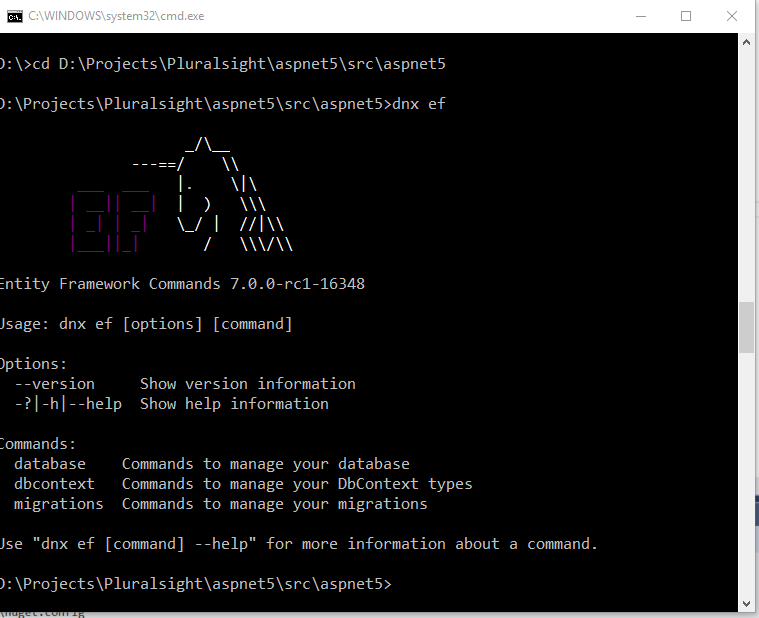
dnvm use -r coreclr 1.0.0-rc1-update1
you have to move the directory to the project default directory to execute dnx command
ex.
D:\Projects\Pluralsight\aspnet5\src\aspnet5
Tuesday, February 16, 2016
Add MVC to ASP.NET 5
using System;
using System.Collections.Generic;
using System.Linq;
using System.Threading.Tasks;
add in ConfigureServices, then add to Configure
using Microsoft.AspNet.Builder;
using Microsoft.AspNet.Hosting;
using Microsoft.AspNet.Http;
using Microsoft.Extensions.DependencyInjection;
namespace aspnet5
{
public class Startup
{
// This method gets called by the runtime. Use this method to add services to the container.
// For more information on how to configure your application, visit http://go.microsoft.com/fwlink/?LinkID=398940
public void ConfigureServices(IServiceCollection services)
{
services.AddMvc();
}
// This method gets called by the runtime. Use this method to configure the HTTP request pipeline.
public void Configure(IApplicationBuilder app)
{
//app.UseDefaultFiles();
app.UseStaticFiles();
app.UseMvc();
}
// Entry point for the application.
public static void Main(string[] args) => WebApplication.Run<Startup>(args);
}
}
Wednesday, February 10, 2016
asp,net 5
http://stephenwalther.com/archive/2015/01/12/asp-net-5-and-angularjs-part-1-configuring-grunt-uglify-and-angularjs
Subscribe to:
Posts (Atom)