Android
Thursday, September 22, 2016

Wednesday, September 21, 2016
Tuesday, September 20, 2016
cell border yes or no
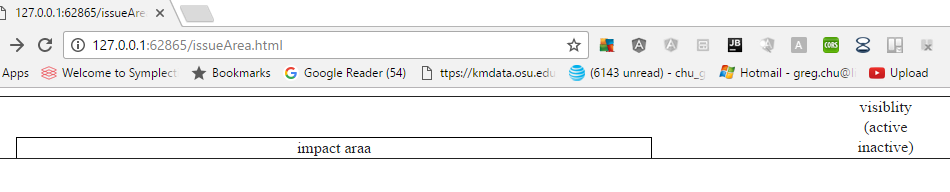
table, th, td {
/*border: 1px solid black;*/
text-align: center;
/*border-bottom: 1px solid black;*/
}
.bottomBorder{
border-bottom: 1px solid black;
border-bottom-width: 1px;
border: 0px;
}
.topBorder {
border-top: 1px solid black !important;
border-top-width: 1px;
/*border: 0px;*/
}
.rightBorder {
border-right: 1px solid black !important;
border-right-width: 1px;
}
.leftBorder {
border-left: 1px solid black !important;
border-left-width: 1px;
}
.allBorder{
border:1px solid black !important;
}
.noTopBorder{
border-bottom-width: 0px;
}
.noBottomBorder{
border-bottom-width: 0px;
border-bottom: 0px !important;
}
.StandardTable {
color:#222222 !important;
border: 1px solid;
/*border: 1px solid #656565;*/
/*-moz-border-radius: 10px;*/
/*-webkit-border-radius: 10px;*/
/*margin-left: auto;*/
/*margin-right: auto;*/
/*box-shadow: 10px 10px 5px #888888;*/
width: 90%;
margin-left: 20px;
margin-bottom: 15px;
border-spacing: 0;
}
<!DOCTYPE html>
<html>
<head>
<title></title>
<meta charset="utf-8" />
<link href="keyword.css" rel="stylesheet" />
</head>
<body>
<div class="content viewing profileBox second" id="cfaesW_admin_ISSUE_area" ng-if="status=='cISSUE'">
<table ng-show="arrISSUE.length > 0" class="StandardTable">
<col>
<colgroup span="2"></colgroup>
<colgroup span="2"></colgroup>
<tr>
<td></td>
<td></td>
<td>visiblity</td>
</tr>
<tr>
<td></td>
<td class="no"></td>
<td>(active</td>
</tr>
<tr>
<td></td>
<td class="topBorder rightBorder leftBorder">impact araa</td>
<td>inactive)</td>
</tr>
</table>
</div>
</body>
</html>
CSS table
https://css-tricks.com/complete-guide-table-element/
table {
border-collapse: collapse;
}
td, th {
border: 1px solid #999;
padding: 0.5rem;
text-align: left;
}
<table>
<thead>
<tr>
<th>Name</th>
<th>ID</th>
<th>Favorite Color</th>
</tr>
</thead>
<tbody>
<tr>
<td>Jim</td>
<td>00001</td>
<td>Blue</td>
</tr>
<tr>
<td>Sue</td>
<td>00002</td>
<td>Red</td>
</tr>
<tr>
<td>Barb</td>
<td>00003</td>
<td>Green</td>
</tr>
</tbody>
</table>
default select drop down value angular js
http://plnkr.co/edit/BsnSvXlSASPm6EAY1brK?p=preview
var app = angular.module('plunker', []);
app.controller('MainCtrl', function($scope) {
$scope.options = [
{
name: 'Something Cool',
value: 'something-cool-value'
},
{
name: 'Something Else',
value: 'something-else-value'
}
];
$scope.selectedOption = $scope.options[0];
});
<!DOCTYPE html>
<html ng-app="plunker">
<head>
<meta charset="utf-8" />
<title>AngularJS Plunker</title>
<script>document.write('<base href="' + document.location + '" />');</script>
<link rel="stylesheet" href="style.css" />
<script data-require="angular.js@1.0.x" src="https://ajax.googleapis.com/ajax/libs/angularjs/1.0.7/angular.js" data-semver="1.0.7"></script>
<script src="app.js"></script>
</head>
<body ng-controller="MainCtrl">
<select
ng-model="selectedOption"
ng-options="option.name for option in options">
</select>
{{ selectedOption.value }}
</body>
</html>
Subscribe to:
Posts (Atom)